

 Chrome Extension
Organise Anything.Launch Everything.
Organise bookmarks, tools, demos, documents, videos, and resources into visual cards you can access instantly.
Free. No account required. Local-first and private by design.

The problem
Most people waste time before work even starts.
Bookmarks were never built for how professionals actually work. Launchpad fixes the daily friction of finding, opening, and re-opening what matters.
Searching bookmarks
Folders get deep. Names get vague. The link you need is never where you left it.
Opening the same sites repeatedly
You type the same URLs every morning — sandbox, docs, dashboards, portals.
Digging through folders
Bookmarks were built for saving, not for launching. Structure breaks under real work.
Hunting scattered resources
Important links live in email, chat, docs, and tabs — not in one reachable place.
Too many browser tabs
Tabs become a temporary memory system. Close one and the context disappears.
The solution
One launch centre for everything you reach for.
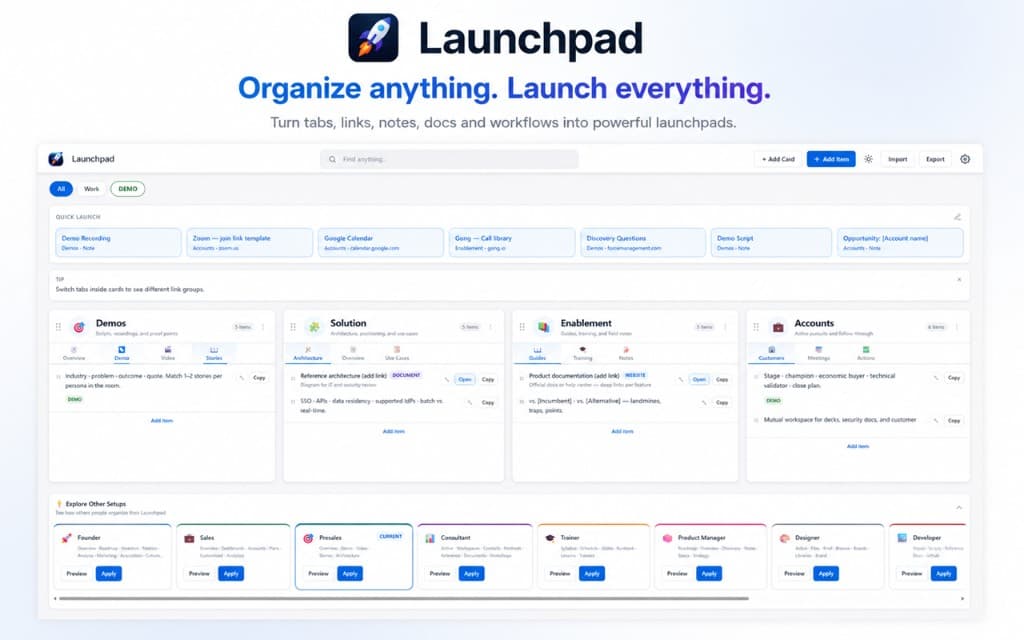
Launchpad turns scattered links into a visual workspace — cards for context, tabs for structure, and instant access when you need to move fast.
- Cards for projects, clients, products, and personal workflows
- Tabs that mirror how you actually organise work
- Drag-and-drop layout you can reshape in seconds
- Quick-access workflows without hunting through Chrome menus
Features
Built for speed, structure, and daily momentum.
Everything you need to replace bookmark chaos with a workspace that feels intentional.
Visual Cards
Organise content into meaningful collections — one card per project, client, or workflow.
Custom Tabs
Overview, Demo, Videos, Roadmaps, Notes, Resources, and more. Shape each card your way.
Drag & Drop
Rearrange cards, tabs, and resources instantly. Your workspace stays flexible as work changes.
Save Current Page
Add the page you are on directly into Launchpad — no copy-paste, no broken URLs.
Import Bookmarks
Bring your existing bookmarks into a cleaner, visual structure in minutes.
Local First
No account required. Your workspace loads fast and stays under your control.
Fast Access
Open what you need in seconds — from one launch centre, not ten browser menus.
Private
Your data stays on your machine. Launchpad is built for personal productivity, not surveillance.
Product
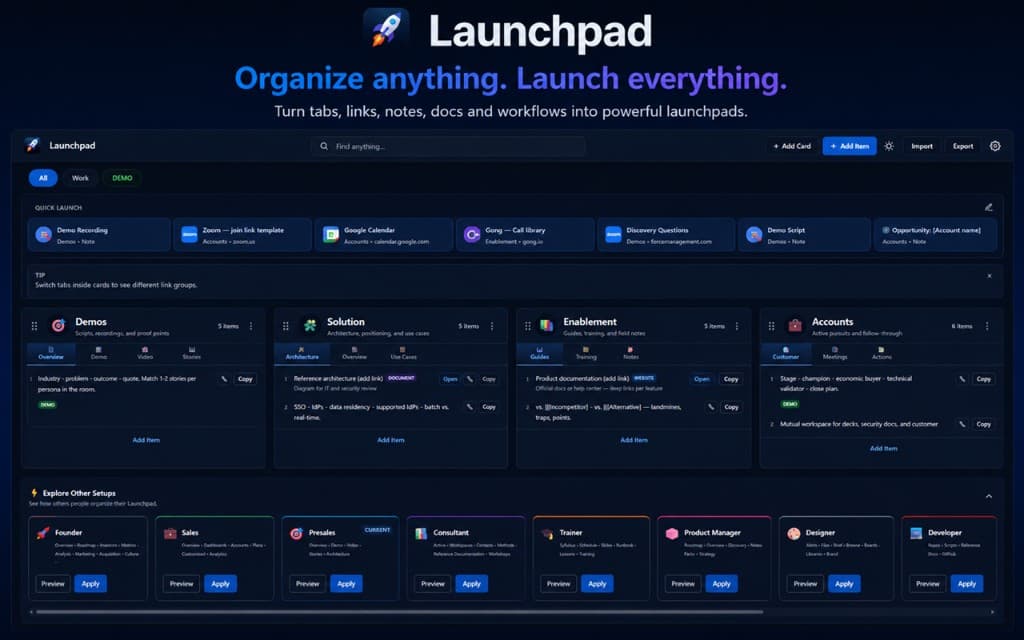
Light or dark — your workspace, your theme.
Quick launch bar, filterable cards, and role templates — all in a layout built for daily use.
Use cases
A personal command centre for every kind of work.
Founders, presales, sales, consultants, trainers, recruiters, students, and professionals — Launchpad adapts to how you organise what matters.
Built for
Founders
Keep product, marketing, and growth resources together — from analytics to launch checklists.
Built for
Presales
Organise demos, environments, scripts, and customer assets before every live call.
Built for
Sales
Manage battlecards, competitors, pricing sheets, and customer content in one reachable hub.
Built for
Consultants
Store frameworks, templates, client portals, and delivery assets without folder chaos.
Built for
Trainers
Keep courses, videos, exercises, and learning material organised by programme or cohort.
Built for
Recruiters
Manage sourcing links, candidate resources, interview guides, and hiring tools in one place.
How it works
From chaos to launch-ready in three steps.
Step 1
Create a Card
Start with a card for a project, customer, course, or workflow — your workspace, your structure.
Step 2
Add Resources
Drop in links, documents, videos, notes, and tools. Use tabs to keep each card scannable.
Step 3
Launch Everything Instantly
Open what you need from one place. Less searching. More doing.
Why not bookmarks?
Launchpad vs traditional bookmarks.
Bookmarks save links. Launchpad helps you launch work.
| Capability | Launchpad | Traditional bookmarks |
|---|---|---|
| Visual organisation | Yes | Limited |
| Grouping by project or workflow | Yes | Limited |
| Custom tabs inside each collection | Yes | Limited |
| Built for daily productivity | Yes | Limited |
| Fast access to recurring resources | Yes | Limited |
| Structured, scannable layout | Yes | Limited |
| One-click launch workflows | Yes | Limited |
| No account required | Yes | Yes |
Social proof
Trusted by people who live in their browser.
Placeholder metrics and reviews — update when your Chrome Web Store listing goes live.
4.9 average rating
Chrome Web Store
12k+
Installs
38%
Less time searching links
“I stopped maintaining three bookmark folders and a spreadsheet of demo links. Launchpad is the first place I open before a customer call.”
“It feels like Raycast for my browser — except everything I care about is already organised into cards I actually use.”
“Importing bookmarks took two minutes. Rearranging my consulting templates into tabs took five. I have not lost a client resource since.”
FAQ
Is Launchpad free?
Yes. Launchpad is free to install from the Chrome Web Store. Core organisation features are available without a subscription.
Does it require an account?
No. Launchpad is local-first. Install it, build your workspace, and start launching — no sign-up wall.
Where is my data stored?
On your machine, inside your browser profile. Launchpad is designed to keep your workspace private and fast.
Can I import bookmarks?
Yes. Bring your existing Chrome bookmarks into Launchpad and reorganise them into visual cards and tabs.
Can I create unlimited cards?
Yes. Create as many cards as your workflows need — product areas, clients, courses, hiring pipelines, and more.
Is my information private?
Launchpad does not require an account and is built around local storage. Your collections stay in your browser unless you choose to export or sync through future optional features.
Support
Need help with Launchpad?
Questions about setup, imports, or feature requests — we read every message.
hello@demosecret.com
Stop Searching. Start Launching.
Turn your browser into a personal command centre. Organise once. Reach everything instantly.
Install in under a minuteNo account required